Home
Models
The model name in the plugin top bar is a button. It controls which model handles the next request you send.
Use this page when you want to switch models, compare model cost/context, or change reasoning effort before a request.
Choose a model
Click the model name in the top bar to open the model picker. Models are grouped by provider so the menu stays readable.
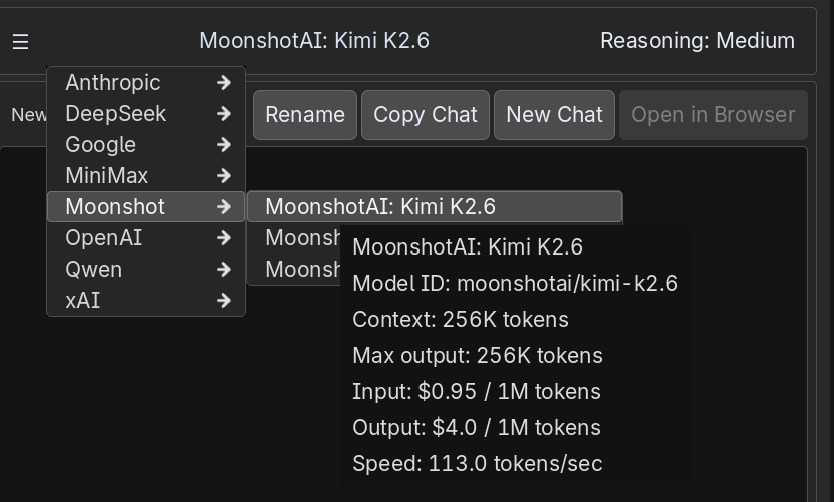
Hover a model row to see details before selecting it:
- Model ID is the OpenRouter model identifier Fennara sends.
- Context is the maximum context window.
- Max output is the largest response budget the model endpoint reports.
- Input is the prompt cost per 1M tokens.
- Output is the completion cost per 1M tokens.
- Speed is recent OpenRouter endpoint telemetry, averaged from the fastest available endpoints instead of only the single fastest one.
The speed value is a rough picker hint, not a promise for your next request. The exact request can still feel faster or slower depending on prompt size, routing, queueing, time to first token, and reasoning behavior.
Model cost
Fennara shows input and output price separately because they are billed differently.
Input cost applies to the context sent to the model: your message, recent chat, tool results, summaries, and project context.
Output cost applies to what the model generates: final answers, reasoning tokens when the provider bills them, and tool-call text.
Long project chats can cost more because the prompt includes more context. Context compaction helps reduce what needs to be sent when a conversation gets large.
For how model costs are deducted from your account, see Pricing and credits.
Reasoning effort
Click the reasoning label in the top bar to choose the effort level for the next request.
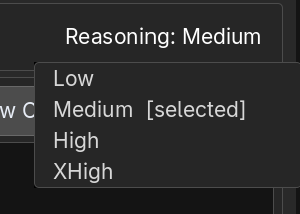
Use lower reasoning for quick questions and small edits. Use higher reasoning when the task needs deeper planning, multi-file debugging, refactors, or careful scene/tool work.
Higher reasoning can improve difficult answers, but it can also take longer and may use more tokens. Those requests appear in Usage after they finish.
Large chats
If the current chat is already large, Fennara may warn before switching to a model with a smaller context window.
That warning is there so you do not accidentally choose a model that cannot fit the current conversation.