Home
History
History lets you reopen previous Fennara plugin conversations from inside Godot.
Use it when you want to continue an older task, check what Fennara changed before, or return to a conversation after restarting Godot.
Open history
Open the plugin menu and choose History.
The History window shows your recent sessions on the left. Select one to preview it before loading.
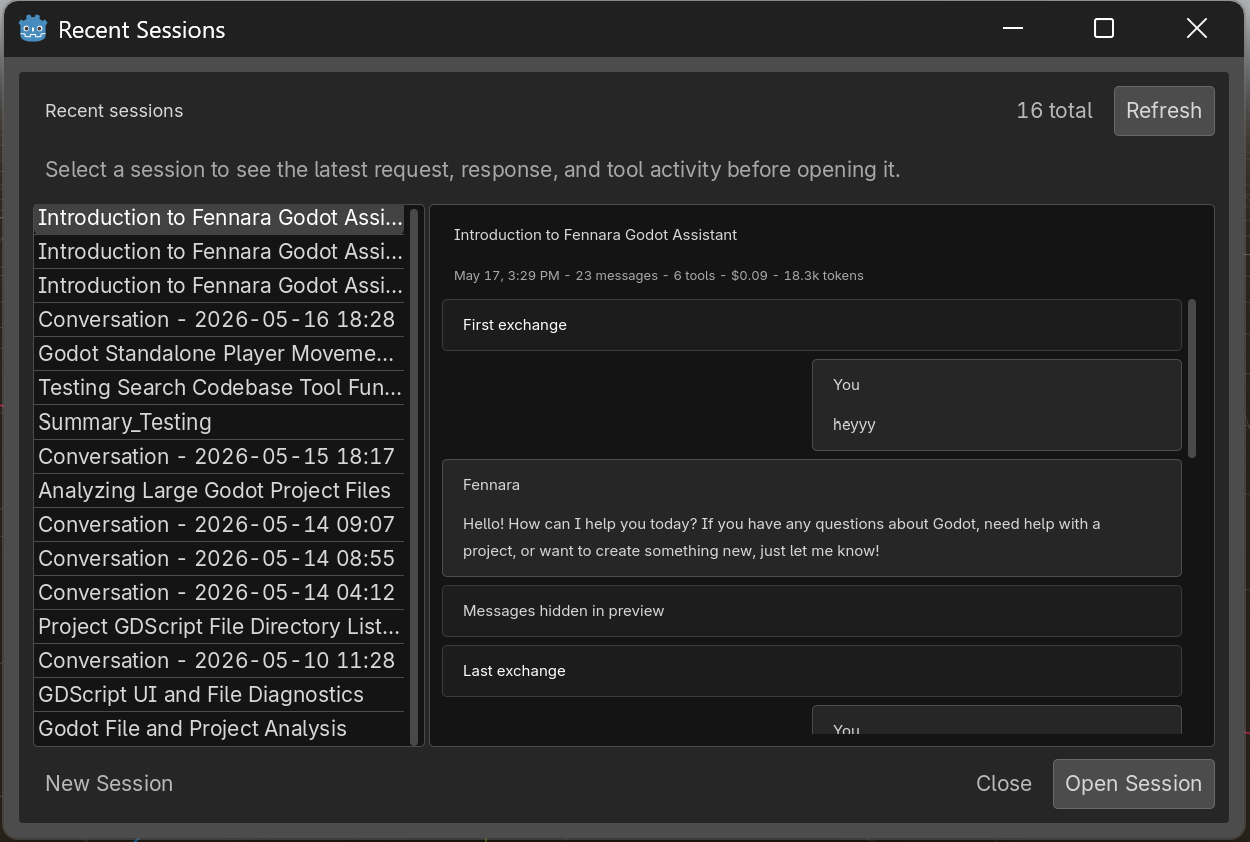
Each session can show:
- the chat title
- when it was last updated
- message and tool counts
- total cost recorded for that session
- the latest chat size in tokens, when available
Use Refresh if you just finished a chat and do not see it yet.
For a full breakdown across sessions and agents, use the Usage page.
Preview a session
Selecting a session shows a lightweight preview on the right.
For short chats, the preview usually shows the exchange. For longer chats, it shows the first exchange, the last exchange, and a note that middle messages are hidden in preview.
Tool activity may appear as a compact summary instead of full output. This keeps the history window readable, especially when a tool read a large file, returned a scene tree, or produced image data.
Reopen a session
Click Open Session to load the selected conversation back into the plugin dock.
After loading, Fennara restores the visible conversation, tool cards, reasoning blocks when available, images, cost badges, and the chat title. The model and chat size indicators update from the saved usage data when that information is available.
You can keep chatting from there. The next request continues in the loaded conversation.
Start fresh
Click New Session from the History window to close the current conversation and start a clean chat.
If a request is still running, finish or cancel it before starting a new session.
Browser history
Use Open in Browser from the chat top bar to open the current conversation on the Fennara website history page.
This is useful when you want more room to review a conversation outside the Godot dock.